Checkout on Amazon
Payment is handled by Amazon
Check return terms
Amazon or seller terms apply
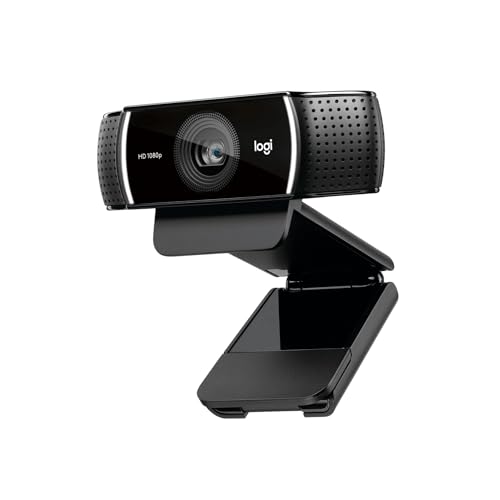
This product — Logitech C922 Pro Stream Webcam, HD 1080p/30fps or HD 720p/60fps Hyperfast Streaming, Stereo Audio, HD light correction, Autofocus, For YouTube, Twitch, XSplit, PC/Mac/Laptop/Macbook/Tablet - Black
Refer to the product listing for full specifications and care instructions. Check compatibility before purchase.
Logitech C922 Pro Stream Webcam - 1080p HD, 60fps, Autofocus, Stereo Audio, Black
- 1Open AmazonView the live listing
- 2Check the priceConfirm price and delivery
- 3Complete checkoutFinish your order on Amazon
Price and availability may change on Amazon.
Key Takeaway
Elevate your streaming game with this Logitech C922 Pro Stream Webcam, designed for high-quality video at HD 1080p/30fps or HD 720p/60fps. Priced at just Check price on Amazon, it features stereo audio, HD light correction, and autofocus, making it perfect for content creators on platforms like YouTube and Twitch. Whether you're streaming, video chatting, or recording, this webcam ensures you look and sound your best every time!
Frequently Asked Questions
What is Logitech C922 Pro Stream Webcam?
The Logitech C922 Pro Stream Webcam is a high-definition webcam designed for streaming and video calls. It offers 1080p resolution at 30 frames per second (fps) or 720p at 60 fps, ensuring clear and smooth video quality.
How much does Logitech C922 Pro Stream Webcam cost?
The Logitech C922 Pro Stream Webcam is priced at Check price on Amazon. This price offers excellent value for its high-quality streaming capabilities and features.
What are the key features of Logitech C922 Pro Stream Webcam?
Key features of the Logitech C922 include HD light correction, autofocus, and stereo audio. It also supports both 1080p/30fps and 720p/60fps streaming, making it versatile for various uses.
Who is Logitech C922 Pro Stream Webcam best for?
The Logitech C922 is ideal for streamers, YouTubers, and anyone needing high-quality video calls. It is compatible with platforms like Twitch, YouTube, and XSplit, making it perfect for content creators.
How do I use/care for Logitech C922 Pro Stream Webcam?
To use the Logitech C922, simply connect it to your PC, Mac, or laptop via USB. For care, keep the lens clean and avoid exposing the webcam to extreme temperatures or moisture.
Check Delivery
Confirm the estimate on Amazon
Amazon Checkout
Payment is handled by Amazon
Check Return Terms
Amazon or seller terms apply
Amazon Support
Use Amazon for order help