Unlock Your Creativity with the One by Wacom Small Drawing Tablet
Our Product Insight
If you’re diving into the world of digital art or looking for a tool to enhance your remote working experience, the One by Wacom Small Drawing Tablet is a fantastic option to consider. This tablet is designed to cater to both budding artists and professionals alike, offering a seamless way to express creativity or boost productivity. With its battery-free stylus and pressure-sensitive technology, you can enjoy a natural drawing experience that feels just like pen on paper.Key Features
1. Battery-Free Stylus
One of the standout features of the One by Wacom tablet is its battery-free stylus. This means you won’t have to worry about charging it or replacing batteries, allowing you to focus solely on your work. The stylus is lightweight and comfortable to hold, making it easy to use for extended periods.2. Pressure Sensitivity
The tablet boasts pressure sensitivity, which allows for varying line thickness based on how hard you press down. This feature is essential for artists who want to create detailed illustrations and nuanced artwork. Whether you’re sketching, painting, or editing photos, the sensitivity adds a layer of depth to your creations.
3. Compatibility
The One by Wacom is compatible with both Windows and Mac operating systems, making it versatile for users across different platforms. This compatibility ensures that you can easily integrate the tablet into your existing setup without any hassle.
4. Compact Size
With its small size, this tablet is perfect for those who may have limited desk space or who want a portable option for on-the-go creativity. It’s lightweight and easy to transport, so you can take it with you to coffee shops, libraries, or wherever inspiration strikes.
5. User-Friendly Setup
Setting up the One by Wacom is a breeze. Simply plug it into your computer, install the necessary drivers, and you’re ready to start creating. The intuitive interface makes it accessible for beginners while still offering features that experienced users will appreciate.
Who It's For
The One by Wacom Small Drawing Tablet is an excellent choice for a variety of users: - Aspiring Artists: If you’re just starting out in digital art, this tablet provides a user-friendly experience that won’t overwhelm you with complicated features. - Graphic Designers: Professionals in graphic design will find the pressure sensitivity and precision of the stylus beneficial for creating intricate designs and illustrations. - Students and Educators: With the rise of remote learning, this tablet can be a valuable tool for students and teachers alike. It’s perfect for annotating documents, creating presentations, or engaging in interactive lessons. - Remote Workers: If you’re working from home, the One by Wacom can enhance your productivity by allowing you to take handwritten notes, sketch ideas, or even sign documents digitally.Pros and Considerations
Pros
- Natural Drawing Experience: The combination of pressure sensitivity and a battery-free stylus provides a realistic drawing experience. - Easy to Use: The straightforward setup and compatibility with major operating systems make it accessible for everyone. - Portable: Its compact size makes it easy to carry around, perfect for artists on the go.Considerations
- Limited Size: While the small size is great for portability, some users may find the drawing area a bit restrictive, especially for larger projects.
- No Screen: Unlike some advanced tablets, this model does not have a built-in screen, which may take some getting used to for those transitioning from screen-based devices.
In conclusion, the One by Wacom Small Drawing Tablet is a versatile tool that caters to a wide range of users, from artists to educators. Its thoughtful design and essential features make it a great addition to any creative toolkit. Whether you’re sketching, designing, or working remotely, this tablet can help you unlock your full potential.
So, if you’re ready to take your digital creativity to the next level, consider giving the One by Wacom a try. You might just find it to be the perfect companion for your artistic journey!
1. For an excellent on-the-go creativity experience, consider the Lenovo Tab M11 Android Tablet, which features a stunning 11-inch Full HD display and comes with a Lenovo Tab Pen for easy drawing. 2. If you're looking for a versatile tablet with impressive specifications, the Luzglo P10 Tablet offers a 10-inch display and Gemini AI, making it perfect for both work and creative projects. 3. The 2026 Upgraded 13.4 inch Android Tablet with Keyboard boasts a large 2K 120Hz IPS Display, providing a fantastic canvas for digital artists who crave high performance and vibrant visuals. 4. Enhance your artistic capabilities with the Lenovo Idea Tab, which includes an 11" 2.5K display and a Tab Pen, designed to elevate your drawing experience to the next level. 5. The Fusion5 2026 Version 12" Windows 11 Tablet PC, equipped with a stylus pen and powerful specs, is an ideal choice for artists seeking a robust platform for their creative endeavors.
More Products You Might Like

Lenovo Tab M11 Android Tablet | 11 Inch Full HD 1200p | 128

Luzglo P10 Tablet Android 16, 10 Inch Tablet, 48GB RAM+128GB

2026 Upgraded 13.4 inch Android 16 Tablet with Keyboard, Lar
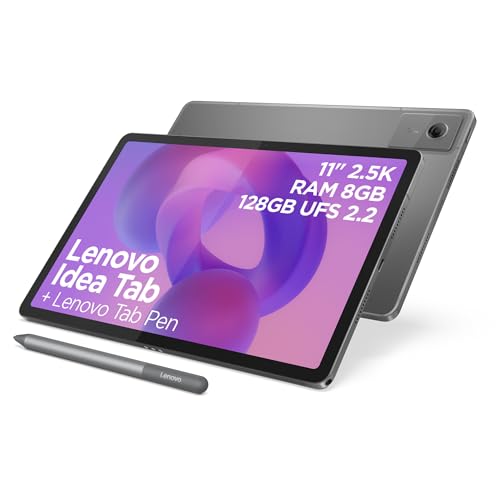
Lenovo Idea Tab - Display 11" 2.5K (2560x1600) 90Hz, Process

Fusion5 2026 Version 12" 2K Display Windows 11 Tablet PC wit
Disclaimer: This article has been generated through our AI content insight system and is intended for general informational purposes only. Please carry out your own research and review product details directly before making any purchase decisions.